The best free EV trip planner that shows every public charging station along your route — Tesla Supercharger, CCS, NACS, CHAdeMO. Pre-filled for 26+ EVs. Better than Google Maps EV routing, complementary to ABRP. No signup, no app install.
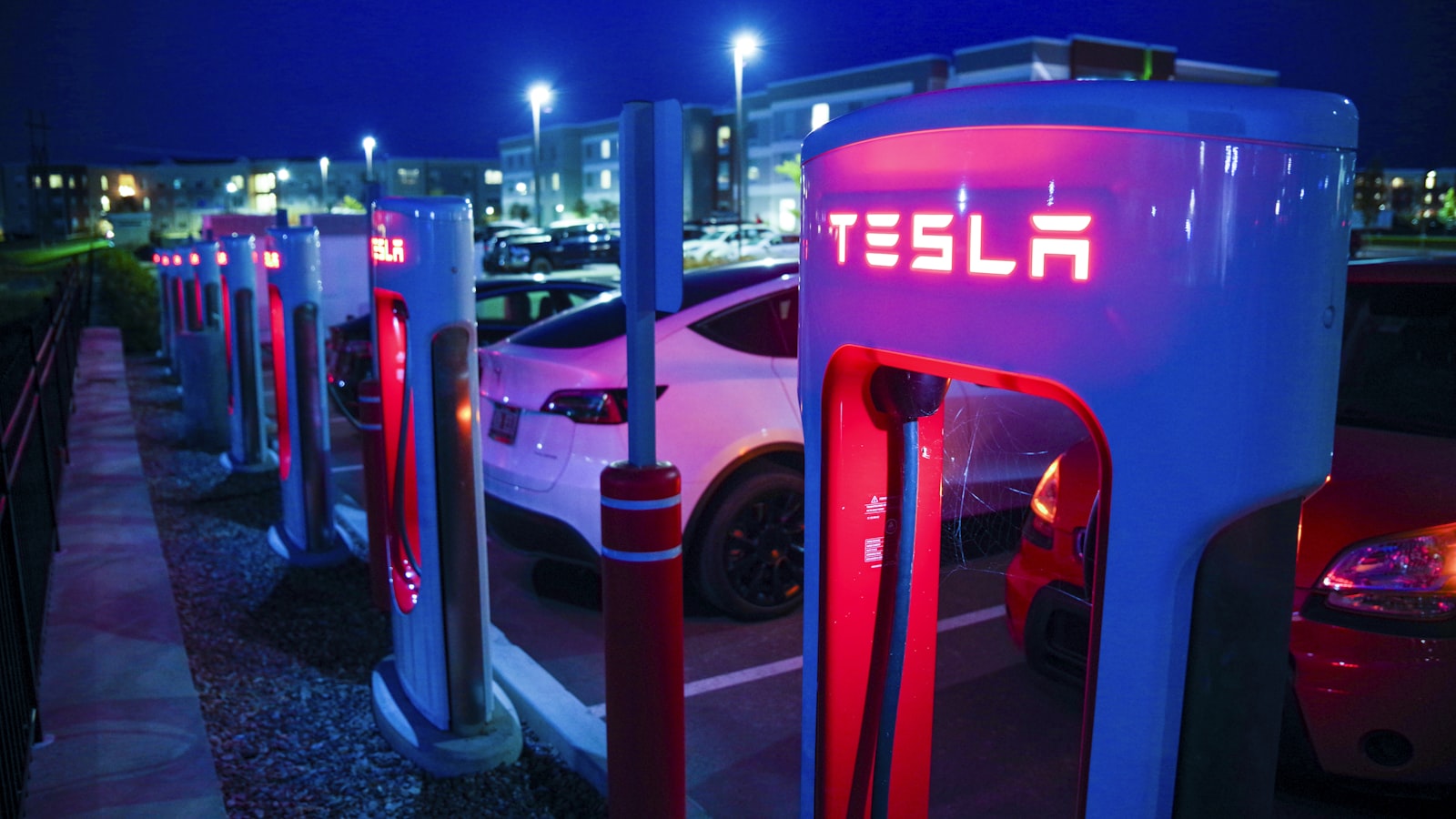
The first long EV road trip I ever planned, I did the math on a napkin in a diner outside Roanoke. 240 miles of EPA range. A 280-mile leg ahead. Plug in for thirty minutes somewhere in the middle. Easy.
Six hours later I rolled into a Supercharger at 4% with the climate off, the cruise pinned at 62, and a knot in my stomach that took two cups of mediocre coffee to undo.
That trip turned me into the kind of person who actually plans. Not in a tense, spreadsheet-y way. In a "this is part of the fun" way. There's a real pleasure to opening up an EV trip planner, dropping pins on a map, and seeing the whole field of charging stations laid out like a constellation along your route. It turns a road trip from a thing you survive into a thing you savor.
This is the guide I wish I'd had that morning in Roanoke. It's about how I now plan every long EV road trip — using the RadiusMapper EV Trip Planner plus a handful of habits that have made the last few years of electric driving genuinely some of the best travel of my life.
An EV trip planner is a map tool that takes a starting point and a destination, draws your driving route, and shows you the charging stations along the way. Sounds simple. The good ones layer on three more things:
A great Tesla trip planner or EV route planner isn't really about the route. The route is easy. The route is just driving directions. The hard part — and the part that turns "is this trip even doable?" into "let's go" — is seeing the full charging picture along your corridor.
That's what the RadiusMapper EV Trip Planner is built for. You give it up to eight waypoints. It pulls every public charging station within fifteen miles of your driving route and overlays them on the map, color-coded by power. Tesla Supercharger, Electrify America, EVgo, ChargePoint, Ionity, Fastned, BP Pulse, and most regional networks worldwide. Free, no signup, sourced live from a community-maintained public charging registry.
Before you open any EV trip planner, it helps to have a feel for how far your car genuinely covers between stops. EPA range numbers are reliable for around-town driving. They are wildly optimistic for an interstate at 75 mph in a 20-degree headwind.
Here are real-world planning ranges I use. Numbers will move ±20% depending on weather, speed, elevation, and how much you have on the roof.
| Vehicle | EPA Range | Highway Range (75 mph, 70°F) | Comfortable Leg Length |
|---|---|---|---|
| Tesla Model 3/Y Long Range | 320–340 mi | 240–270 mi | 180–220 mi |
| Tesla Model S | 400 mi | 290–320 mi | 220–260 mi |
| Tesla Model X | 335 mi | 240–270 mi | 180–220 mi |
| Rivian R1T / R1S | 270–410 mi | 200–290 mi | 150–230 mi |
| Ford F-150 Lightning ER | 320 mi | 220–250 mi | 160–200 mi |
| Hyundai Ioniq 5 / Ioniq 6 | 270–360 mi | 210–280 mi | 160–220 mi |
| Kia EV6 / EV9 | 280–310 mi | 210–240 mi | 160–190 mi |
| Chevy Equinox EV / Blazer EV | 300 mi | 220–240 mi | 160–190 mi |
| Lucid Air | 410–516 mi | 310–410 mi | 240–320 mi |
| Polestar 2 / 3 | 270–320 mi | 200–240 mi | 150–190 mi |
The "comfortable leg length" column is the one I plan to. It bakes in a 15–20% buffer for headwind, weather, elevation, and a backup option if my first chosen charger has a queue. Plan to that number and your trip becomes relaxed. Plan to the EPA number and you'll be that person doing 62 in the right lane with the heat off.
If you want a deeper dive on driving distance by time rather than by battery, I wrote a separate piece on how far you can drive in 1, 2, 3, or 4+ hours that pairs nicely with this one.
I've used most of the EV trip planners worth mentioning — A Better Routeplanner, PlugShare's route view, Google Maps' EV layer, the in-car Tesla planner, ChargeMap, and a half dozen brand-specific apps. They all do something well. None of them do everything.
The best EV trip planner for any given trip depends on what you actually need:
That's the honest answer. There's no single "best" — there's a planning workflow that uses the right tool at the right moment. The EV trip planner here is the front-end of that workflow: figuring out whether a trip is shaped right before you commit.
Google Maps got an EV layer a while back. It's worth knowing what it does and doesn't do.
What Google Maps does: shows nearby chargers if you toggle the EV layer, suggests charging stops on long routes for some specific Google-partnered EVs (Volvo, Polestar, certain Ford models), and integrates real-time station status where partnered networks share it.
What Google Maps doesn't: surface every charger along a long-distance route corridor automatically, work for arbitrary EVs (the in-route charging suggestions are limited to specific OEM partnerships), or show you the field of options to compare networks side by side. Toggle the EV layer and you have to manually search around your route to find chargers. Tedious.
The RadiusMapper EV trip planner does the corridor query in one shot. Enter origin, destination, and (optionally) your car. It pulls every public charging station within fifteen miles of your route — Tesla Superchargers, Electrify America, EVgo, ChargePoint, Ionity, Fastned, plus regional networks worldwide — and color-codes by power class. You see the whole field at a glance, no manual searching.
If you're driving a Tesla, the Tesla Supercharger trip planner view is essentially the red dots on the RadiusMapper map. Every public Tesla Supercharger along your driving corridor shows up with:
Tesla owners typically use the planner to scope a trip before opening the in-car nav (which is great for one-route execution but less great for comparing options). Many Tesla drivers also use it to spot non-Tesla fallback chargers — Electrify America 350 kW stalls, EVgo high-power sites, Ionity in Europe — that they can now access with a J3400/CCS adapter when Superchargers are queued or down.
For a single-vehicle pre-built planner, jump straight to the Tesla Model 3, Model Y, Model S, Model X, or Cybertruck page — each pre-fills the EPA range and peak charging speed for that car.
Short answer: the RadiusMapper EV trip planner is a web app. It runs in any phone or desktop browser. There's no native app to install — the trip-planner workflow leans on dropping pins, sharing a URL, and opening the same map across devices without logins, which is what a web app does well.
If you want a native app experience: most modern browsers (Chrome on Android, Safari on iOS) let you "Add to Home Screen" from the share menu, which gives you an icon on your phone that opens the planner full-screen, no browser chrome, like a native app. That's how I use it. The planner state isn't lost when you swap between mobile and desktop because the share URL encodes the full route.
Drop your origin, destination, and any stops in between. The EV trip planner maps every public charging station along your route — Tesla Superchargers, Electrify America, EVgo, ChargePoint, Ionity, Fastned, plus regional networks worldwide.
Open the RadiusMapper EV Trip Planner
Free. No account. Up to 8 waypoints. Every public charger along your route, color-coded by power class.
These are the rules of thumb I've stitched together over thirty thousand-ish EV miles across two countries and four cars. They are not strict. They are the difference between a trip that flows and a trip that feels like a math problem.
DC fast charging slows down hard above 80% state-of-charge. The last 20% of your battery takes almost as long to add as the first 60%. Once I started arriving at chargers around 10–15% and leaving around 70–80%, two things happened: my total charging time per trip dropped meaningfully, and the stops felt shorter because I never sat there watching the kilowatts fade. Most modern EV trip planner tools, the RadiusMapper one included, are happiest when you treat 60% of your battery as your usable leg.
If your battery shows 200 miles when you pull out of a charger, your next stop should be no more than 140 miles down the road. The 70% rule absorbs everything you don't know yet. Wind. Weather. A closed station. A missed exit. An unplanned detour to find lunch. If your route plan can't satisfy 70%, add a stop you don't think you'll need.
The single biggest mindset shift for me was learning to plan stops around things I wanted to do anyway. A 25-minute charge stops being a chore the moment it overlaps with a great taco. The EV trip planner shows the operator and address for each charger; I cross-reference with Google Maps, look for places to walk, and pick the charger that puts me near a small bakery, a record store, a state-park trailhead, anything. Charging stops became my favorite part of road trips this way.
For every charging stop on my itinerary, I make sure I know the next viable option, ideally within 25 miles or 30 minutes off-route. Modern charging networks are reliable, but stalls do go down occasionally and queues do happen on holiday weekends. Knowing where Plan B is means I never feel cornered. The EV trip planner makes this trivial: every charger within fifteen miles of your corridor is right there on the map. Pick a primary, eyeball a backup, drive on.
Cold mornings below 20°F can cost you 25–30% of highway range. Sustained 80 mph instead of 65 costs another 15–20%. A long climb of three thousand feet eats range disproportionately on the way up (you do get some back coming down). If your trip combines two of these, build in an extra short stop and stop worrying about it. If it combines all three, you're driving the Rockies in February and you should plan two extra stops and bring a thermos.
I want to spend a moment on the part nobody wrote about ten years ago, because it's genuinely the best part of EV travel: the rhythm.
A gas-car road trip is a series of forty-five-minute sprints separated by five-minute fuel stops. You burn through caffeine and granola bars, you drive past every interesting town because stopping breaks the cadence, you arrive tired.
An EV road trip has a different shape. Three hours of driving. Twenty-five minutes of being somewhere. Three hours of driving. Twenty minutes of being somewhere. The pace forces you to stop at places you'd otherwise blow past, and a lot of those places turn out to be wonderful. I've eaten at small-town diners I'd never have found in a gas car. Walked Main Streets in towns whose names I didn't know that morning. Sat under a tree at a rest stop in Wyoming and watched a thunderstorm roll across two valleys while my car charged behind me.
The right EV trip planner doesn't just tell you whether your trip is doable. It tells you where the interesting charging stops are. The RadiusMapper EV Trip Planner puts every option on the map, fast chargers in red and amber, slower destination chargers in gray, and lets you pick the stops that work for the trip you actually want, not just the trip the optimizer thinks you should take.
The tool itself is straightforward. There are basically four steps, and you can plan a coast-to-coast trip in under five minutes.
Type a city, address, or landmark into the origin and destination fields. Autocomplete handles place names worldwide — Boise, ID; Schloss Neuschwanstein; "the diner outside Roanoke." Whatever works.
The EV trip planner supports up to eight waypoints total — origin, destination, and up to six stops in between. Use these for sightseeing detours, overnight stops, or places where you want to leave the route slightly to charge near a particular town. Stops are reorderable and removable.
Hit "Plan route + chargers" and the tool draws your driving route, then queries the public charging registry for every station within fifteen miles of the corridor. The result is a map and a sidebar list. Both are color-coded:
Click any charger on the map or in the sidebar to see operator, max power, connector types, and full address. The list and map stay synced — clicking on either side highlights the station everywhere — so you can quickly evaluate options as you pick your charging stops.
That's it. Once you've picked your stops, your trip is planned. You can then push the route into your in-car nav, your favorite turn-by-turn app, or just save the page and reference it as you drive.
The EV trip planner is vehicle-agnostic. It works for every electric car. A few notes on what to watch for if you're driving a specific make:
If you're driving a Tesla, almost every red dot on the map is a Supercharger and every connector is the NACS (J3400) you already have. Tesla's own in-car nav is excellent for executing the trip; this Tesla route planner is most useful for the scoping phase, where you want to see the whole field, including non-Tesla networks like Electrify America that you can now access with a CCS adapter.
NACS adoption is moving fast. Most new non-Tesla EVs ship with a NACS adapter that unlocks compatible Tesla Superchargers — those are flagged in the connector list under each station. CCS networks (Electrify America, EVgo, ChargePoint, Ionity in Europe) remain the primary backbone for non-Tesla road trips. The connector list under each charger shows you exactly what's there.
In Europe, the EV trip planner lights up with Ionity, Fastned, Allego, BP Pulse, Tesla Supercharger, plus a long tail of national networks. CCS2 is the universal connector. Cross-border road trips (France to Italy, Germany to Austria, Netherlands to Norway) are very well-covered.
Coverage is genuinely worldwide. Tesla Supercharger, ChargePoint, EVgo, Chargefox, Ampol, BP Pulse, Petro-Canada, Greenlots, and most regional networks are all in the dataset. If a public charger exists in the live registry the planner pulls from, the EV trip planner will find it.
Trip-planning errors that have bitten me at one point or another:
If this was useful, a few other RadiusMapper resources you might enjoy:
The tools themselves:
Yes. Completely free, no account, no signup, no usage caps. Plan as many trips as you want.
Yes. The planner is vehicle-agnostic. It shows every public charging station along your route regardless of make or model — Tesla Supercharger, Electrify America, EVgo, ChargePoint, Ionity, Fastned, BP Pulse, plus regional networks. Filter by reading the connector list under each station: NACS (Tesla), CCS1, CCS2, CHAdeMO, and J1772 are all labeled.
Absolutely. If you're driving a Tesla, the Tesla trip planner view is essentially the red and amber dots on the map. Every Supercharger along your route is shown with max kW, address, and connector info. Many Tesla drivers also use it to spot non-Tesla fallback chargers (CCS networks like Electrify America and EVgo) that they can now access with a J3400 adapter.
Live from a community-maintained registry of public charging stations worldwide, updated continuously by EV drivers and network operators. For real-time station status (whether a specific stall is currently working), it's still worth a quick check in the operator's own app or Plugshare before you arrive.
The number is the maximum reported power per station from the public charging registry. Real-world delivered power depends on your specific vehicle's charge rate, the stall you plug into, ambient temperature, and your current state-of-charge. Treat the rating as a ceiling, not a floor.
Up to eight waypoints — origin, destination, and up to six intermediate stops. The driving route runs through every waypoint in order, and the charger overlay updates for the full multi-leg itinerary. Plenty for a weekend trip, a multi-day road trip, or a cross-country drive.
The EV trip planner filters to chargers within fifteen miles of the driving corridor — close enough to be a realistic detour. If you're driving through a true charging desert (parts of the rural West, northern Canada, the Australian Outback), the map will be sparse. That's the data telling you the trip needs an extra waypoint near a charging cluster. Add a stop near the nearest known charger and replan.
Yes. Every public Tesla Supercharger is included, color-coded red for V3 sites (250 kW+) and amber for older V2 sites (150 kW). Connector types under each station tell you whether it's NACS-only or has a Magic Dock for CCS. Coverage includes the U.S., Canada, Mexico, Europe, the U.K., Australia, China, Japan, and more.
Yes. Use waypoints to mark your overnight stops (a hotel, a friend's house, a campground) and the EV trip planner will route through them in order, showing chargers along every leg. Pair the daytime fast-charging stops with overnight Level 2 charging at your accommodation if it's available, and you've got a full multi-day plan.
Two possibilities: it's more than fifteen miles off your route corridor (add a waypoint near it to bend the route closer), or it's a private/restricted-access station and isn't in the public charging registry the planner pulls from. The EV trip planner covers public charging only.
EV road trips are good. Genuinely, weirdly, surprisingly good. The cars are quiet. The acceleration is fun. The charging stops force you to discover places you'd otherwise drive past at 75 mph. And the EV trip planner is the part that takes the math out of the front end so you can spend the trip looking out the window instead of doing battery percentage arithmetic in your head.
Open the EV Trip Planner. Drop your pins. Pick your stops. Pack snacks. Go.
Safe trips. ⚡
 RadiusMapper