 RadiusMapper
Drive-time maps
See who can actually reach your site
Drive time demographics, counted for the exact shape the roads allow
Type an address and watch the drive-time zone follow the real roads. Then read the people, homes and income inside it before you ever tour the space.
Just need the map? Try the free driving radius calculator or the isochrone map generator.
Overview
Ten minutes away is not a circle
The usual way to count the people near a site is a three-mile ring with census numbers pulled for it. If half that ring sits across a river with no bridge, the number is off.
Here you search the address, pick drive, bike or walk, and set the minutes. The zone traces how far the roads actually get you, then counts the people, households, income and housing inside that shape. Tracts that straddle the edge only count for the part inside. Income, rent and home values are brought forward to today's dollars, too.
To compare, run 5, 10 and 15 minutes, or three different addresses, and each one lands as its own layer. Send the client a link, or take the shape into your GIS as a shapefile.
Real roads
See the Area People Can Actually Reach
A mile radius pretends the river isn't there. These zones follow the road network for the way people travel, so they stretch out along the highway and stop where the roads stop. Driving, cycling and walking are each routed on their own, which is why a 15-minute walk looks nothing like a 15-minute drive.
- Drive, cycle or walk, set to the exact minute
- Distance in miles, still traced on roads
- Right-click any point for a quick 10-minute drive zone
Who lives inside
Census Numbers Counted for the Exact Shape
The moment a zone draws, the panel fills in with population, households, median income, age, home value, rent and commute. A tract that crosses the edge counts only for the share inside, so one that barely touches the line adds a sliver, not its whole population. Dollar figures are brought forward to today's money.
- 10 census measures on screen, more in the PDF report
- Tracts weighted by the share of their area inside
- Income, home value and rent adjusted for inflation
Compare and share
Stack Zones, Then Send Them Anywhere
Every analysis becomes its own colored layer, so 5, 10 and 15 minutes, or three candidate sites, sit on one map. Rename them, recolor them, hide the ones you're done with. When it's time to share, copy a view-only link or export the report and the shape.
- Re-running the same zone refreshes it instead of stacking a copy
- A view-only share link for every analysis
- PDF report, GeoJSON and shapefile downloads
Capabilities
How the Zones and Numbers Work
Zones drawn on real roads
Each zone follows the road network for the mode you pick, so it bends around water and reaches farther along highways.
Drive, cycle or walk
Every mode is routed on its own, which is why a 15-minute walk and a 15-minute drive produce very different shapes.
Minutes or miles
Set a travel time in minutes, or switch to distance and enter miles while the zone still follows the roads.
Demographics weighted to the shape
Each census tract counts by the share of its area inside the zone, so a tract that barely touches the edge adds only a sliver.
Dollar figures in today's money
Median income, home value and rent are adjusted from the survey year to current dollars using the consumer price index.
Compare zones on one map
Every analysis becomes its own layer you can rename, recolor or hide, and re-running the same settings refreshes it instead of duplicating it.
Start from anywhere
Search an address, reopen one of your recent searches, or right-click the map and choose Generate, then Radius Map.
Share and export
Each analysis gets a view-only share link, a PDF report, and GeoJSON and shapefile downloads with the demographics attached.
Use Cases
Where Drive Time Changes the Answer
Drive time analysis for a second dental office
You're helping a three-office dental group choose between two leases. Pick the one that overlaps their current office and you've split their patients instead of growing them.
Result: You walk into the partners' meeting knowing how many households each lease reaches, and where each one overlaps the office they already have.
Sizing a quick-service franchise territory by drive time
A prospective franchisee wants to know what the territory holds, and your guidelines are written in drive minutes, not miles. A circle on a PDF won't answer that.
Result: They get three bands with real household and income counts, plus links they can open on their own time.
Drawing realistic service zones for an HVAC company
The owner promises same-day service, and techs keep getting sent to jobs an hour out. They want a service area built on where a truck can really get in 30 minutes.
Result: Dispatch gets a 30-minute zone it can load into scheduling software, and sales works from the same map.
Comparing walking distance maps for an infill apartment site
You're pitching a lender on a car-light apartment project, and they want proof residents can get around without driving. Rent and household data for a ten-minute walk makes that case better than adjectives.
Result: The loan package gets walk and bike zones with the rent and household numbers behind them.
Reference
What a drive-time analysis returns
Inputs
- Address, place or map point
- Travel mode: drive, cycle or walk
- Travel time in minutes
- Distance in miles, as an alternative
- Right-click any point for a 10-minute drive zone
People and income
- Population
- Households
- Median household income
- Median age
- Per capita income (PDF report)
- Census tracts counted (PDF report)
Housing
- Median home value
- Median rent
- Owner-occupied share
- Vacancy rate (PDF report)
Education and commute
- Bachelor's degree or higher
- Graduate degree (PDF report)
- Average commute time
- Worked from home
- Drove alone (PDF report)
- Public transit (PDF report)
Outputs
- Map layer with its own color and name
- Share link for every analysis
- Full report PDF with a map snapshot
- GeoJSON with demographics as properties
- Zipped shapefile, ready for desktop GIS
- Recent searches and saved locations
Works With
Connected to the Rest of Your Map
Data layers
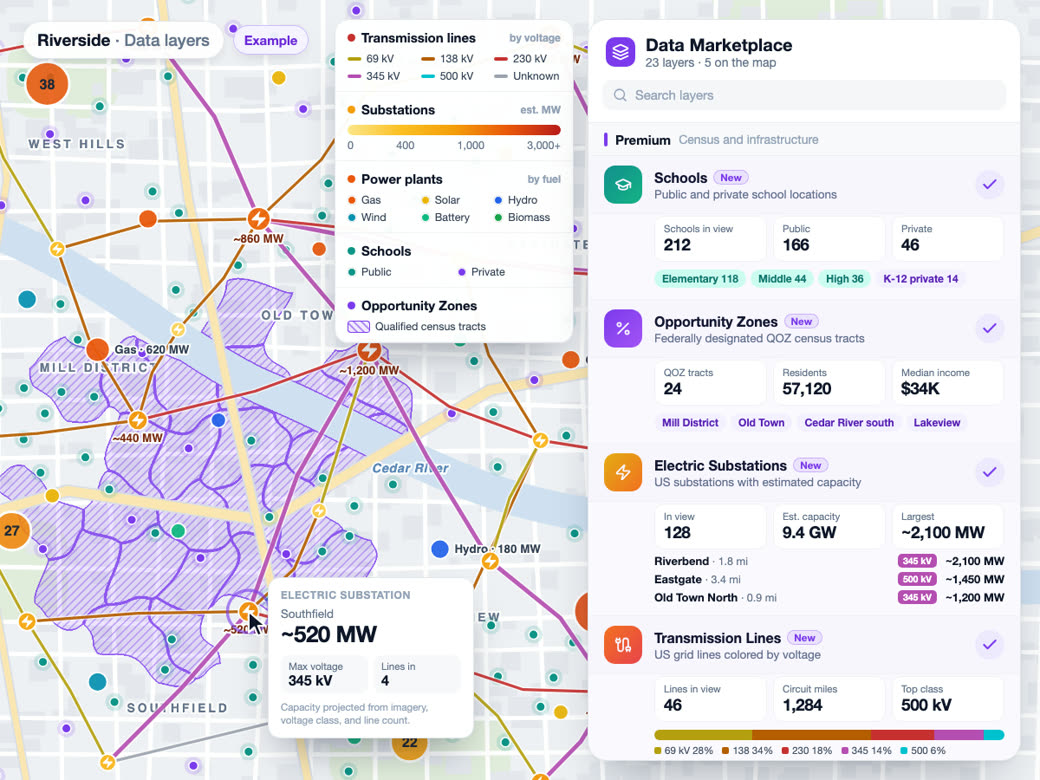
Zone totals come from the same census tracts the Data catalog maps, so switching on a layer like Median Rent shows how values vary inside the zone.
Learn more
Reports and exports
The export menu on any analysis builds a PDF report with a map snapshot and demographic tables, plus the zone as GeoJSON or a shapefile.
Learn more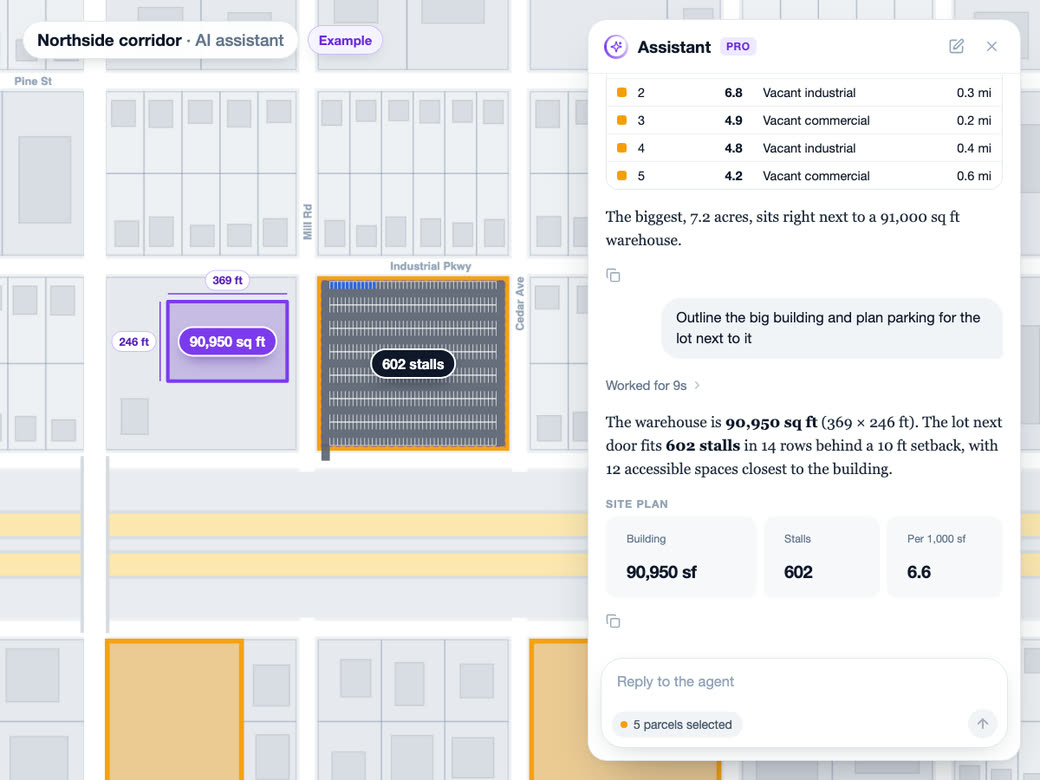
AI analyst
The AI analyst reads the selected radius analysis as context, so it can answer questions about the zone you have open.
Learn moreSolutions
Where Teams Use It
Site SelectionLearn more
Score and rank potential locations.
Trade Area AnalysisLearn more
Customer catchment and market penetration.
Location IntelligenceLearn more
Foot traffic, demographics and market insight.
Competitive AnalysisLearn more
Market share, overlap and white space.
Fleet & LogisticsLearn more
Delivery zones and service coverage.
Territory MappingLearn more
Sales territories built on real drive times.
Try Drive-time maps on Your Own Site
Free to start. No credit card required.
Common Questions
What are drive time demographics?
They're the census numbers for everyone who lives within a set drive, walk or bike time of a location, counted for the shape the roads actually allow. The point is to replace the mile ring, which happily includes the far side of a river you can't cross.
How do I find the population within a 10 minute drive?
Search the address, open Radius, choose Drive and set 10 minutes. Click Analyze this place and the zone draws along the roads, with population, households and median income filled in beside it. For a quick zone, right-click any point and choose Generate, then Radius Map. You get the same 10-minute drive zone.
How do you calculate the population within a drive time radius?
We lay the zone over census tracts and measure how much of each one falls inside. Counts like population and households are scaled by that share, and medians are weighted by the people or homes behind them. You get an estimate for your shape, not the total of every tract it grazes.
What is the difference between a radius map and a drive time map?
A radius map draws a circle, roads or no roads. A drive time map follows the street network, so it runs long down a highway and stops short at a river or rail yard. If the question is how people actually get to you, the drive time shape is the closer answer.
How accurate are drive time demographics?
Zones come from routing along the road network for each mode, so think of them as a typical trip, not rush hour on a Friday. The demographics are census estimates for small areas. That's solid ground for comparing sites and setting service areas, and it's still worth driving the route at your busiest hour.
Can I export a drive time polygon to GIS?
Yes. Download any zone as GeoJSON or a zipped shapefile, with the address, mode, minutes and the zone's demographics attached. Shapefile rings are ordered the way strict desktop GIS readers expect, so it opens without cleanup.