 RadiusMapper
Projects and workspace
Every deal you're working, one click apart
Real estate mapping software that keeps every deal in its own project
Each site gets its own project with its layers, drawings and analysis saved where you left them. Open a few side by side as tabs and jump between them without losing your place.
Overview
The map is still there when a deal comes back
When a deal goes quiet for three weeks and then the buyer calls, the map usually has to be rebuilt: find the seller's shapefile in downloads, redraw the parcel, remember which layers were on.
Here every site gets its own project. The layers you switched on, the county file you dropped in, the acreage you measured, the Intel zone you ran and the site plan you sketched all stay with it, saved as you work. Open it from Home, where each project shows a picture of its map, or keep your live deals open as tabs across the top and click between them like a browser.
Every tool, every dataset and the AI analyst work inside the same project, so the work stays in one place instead of in files and folders. When the deal comes back, it's all still there.
Home screen
Find Any Deal by What Its Map Looks Like
A list of names doesn't help much when you have fifteen listings and three of them are called Untitled. Home shows every project as a card with a picture of its map, when you last touched it and how many layers it holds. Hit New for a blank map, or drop a file anywhere on the page and a project opens, named after it, with your data already on the map.
- Thumbnails captured from each project's own map
- Drop a CSV or shapefile to start a project named after it
- Rename, duplicate or delete with a right-click
Project tabs
Click Between Deals Like Browser Tabs
Your live deals sit across the top of the screen, like tabs in a browser. Click one and you're in that project, with its layers, open panel and map view right where you left them. Drag tabs into the order you work, double-click to rename, middle-click to close.
- Open tabs load at startup, so switching doesn't wait
- Right-click a tab to rename, duplicate, close or delete it
- Each tab keeps its own open panel and selected parcel
Saved as you go
Come Back to a Deal Exactly as You Left It
A project holds the work, not just the map. Data layers and folders, the county file you dropped in, every measurement, Intel zones with their results, the site plan and the camera angle all save as you go. And because the AI analyst works inside the same project, it starts from what you've already built instead of a blank map.
- Layers, folders, shapes, Intel zones and site plans
- No save button: changes save moments after you make them
- The AI analyst reads the project you have open
Capabilities
How Projects Keep the Work Together
One project per deal
Each site gets its own map, layers and work, so nothing from one deal bleeds into another.
Home with map thumbnails
Every project shows as a card with a picture of its map, when you last edited it and how many layers it holds.
Start from a file
Drop a CSV, GeoJSON, KML, GPX, zipped shapefile or drone photos on Home and a project named after the file opens with the data on it.
Browser-style tabs
Keep live deals open across the top, drag to reorder, double-click to rename and middle-click to close.
Switching without the wait
Open tabs load when the app starts, so moving between them doesn't sit on a loading screen.
Saves as you work
Layers, shapes, Intel zones, site plans and the map view save on their own, with no save button to forget.
Duplicate for a second scenario
Copy a project with its map view, data layers, shapes, Intel zones and site plan to test another idea side by side.
Find and tidy up fast
Search projects by name, select several with Cmd, Shift or a drag box, and delete the finished ones together.
Use Cases
How Busy Teams Keep Their Deals Straight
Keeping 15 listings organized as a commercial broker
You're a commercial broker carrying fifteen listings, each with its own comps, parcel lines and a buyer who can call at any time.
Result: When a buyer calls, you open that listing's tab and the comps, measurements and layers are where you left them, with nothing from the other fourteen in the way.
Running three development deals through diligence at once
You're a developer with three sites under contract and three diligence clocks running. Zoning comes back on one, flood on another, and the site plan for the third is half done.
Result: Each deal lives in its own project with its own layers, measurements and site plan, plus a copy for the other layout. When a partner asks where a site stands, you open the tab and show them instead of piecing it back together from email.
Comparing four metros for a regional retail expansion
You lead real estate for a growing retail brand, and leadership wants a pick between four metros by quarter end. Keeping four markets straight across files, decks and someone's desktop is usually the hard part.
Result: In the review you click through four tabs, one per metro, each with the same layers on and its zones already run. Questions get answered on the map.
Starting a land deal from the seller's shapefile
You buy land for a homebuilder, and the seller's broker just emailed a zipped shapefile of a 60-acre tract with a short deadline.
Result: The tract lands in its own project when you drop the file, and you check ownership and measure the usable acres yourself. When the seller calls back next month, that work is still there.
Reference
What a project remembers
The map
- Map position, zoom, tilt and rotation
- Data layers you switched on
- Layer names, visibility and draw order
- Layer folders
- Uploaded files placed in the project
- The open data sheet and map popup
Your work
- Distance and area measurements
- Shape names, colors, locks and visibility
- Intel zones and their results
- Site plan buildings, parking and layout
Home screen
- A map thumbnail for each project
- Name and when it was last edited
- How many layers it holds
- Search projects by name
- Select several with Cmd, Shift or a drag box
- Library of your data and reports
Project tabs
- Drag to reorder
- Double-click to rename
- Middle-click to close
- Pull a tab off the bar for a preview card
- Open tabs remembered on your device
- Each tab keeps its open panel and selection
Project actions
- New project from Home, the tab bar or ⌘K
- Start from a dropped file
- Open
- Rename
- Duplicate
- Close tab
- Delete one or several at once
Files that start a project
- CSV
- GeoJSON and JSON
- Zipped shapefile
- KML
- GPX
- Drone photos
Works With
Connected to the Rest of Your Map
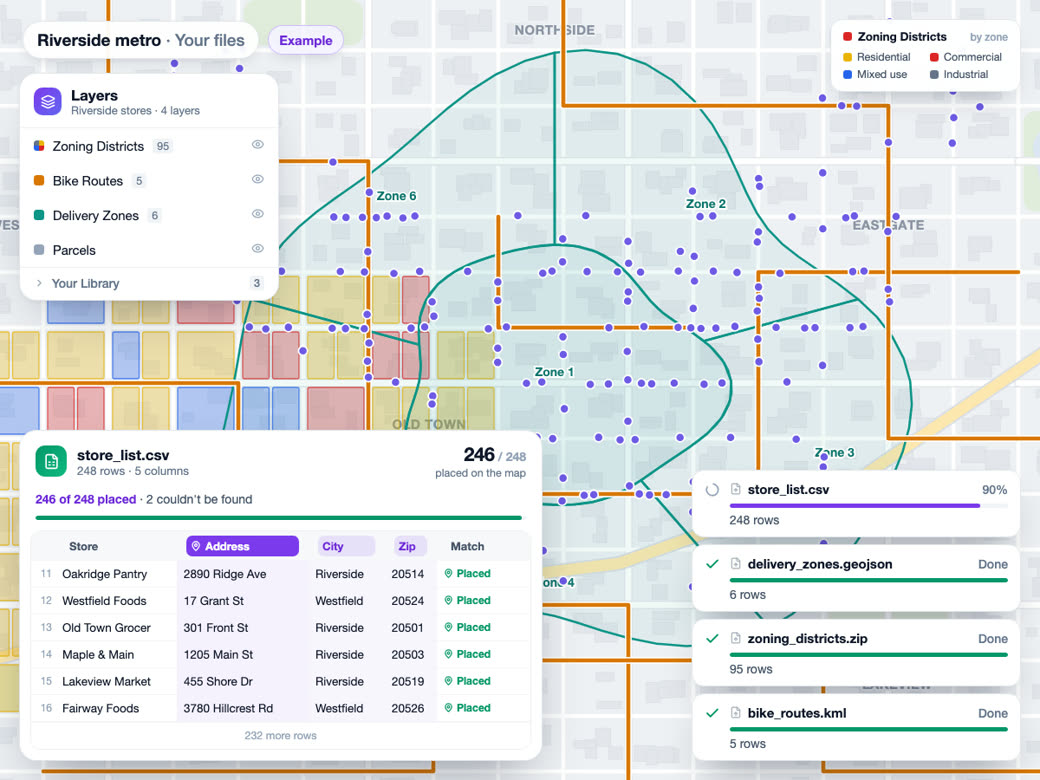
Bring your own data
Drop a file on Home and a new project opens, named after it, with the data already on the map, and the file stays in your library for other projects.
Learn more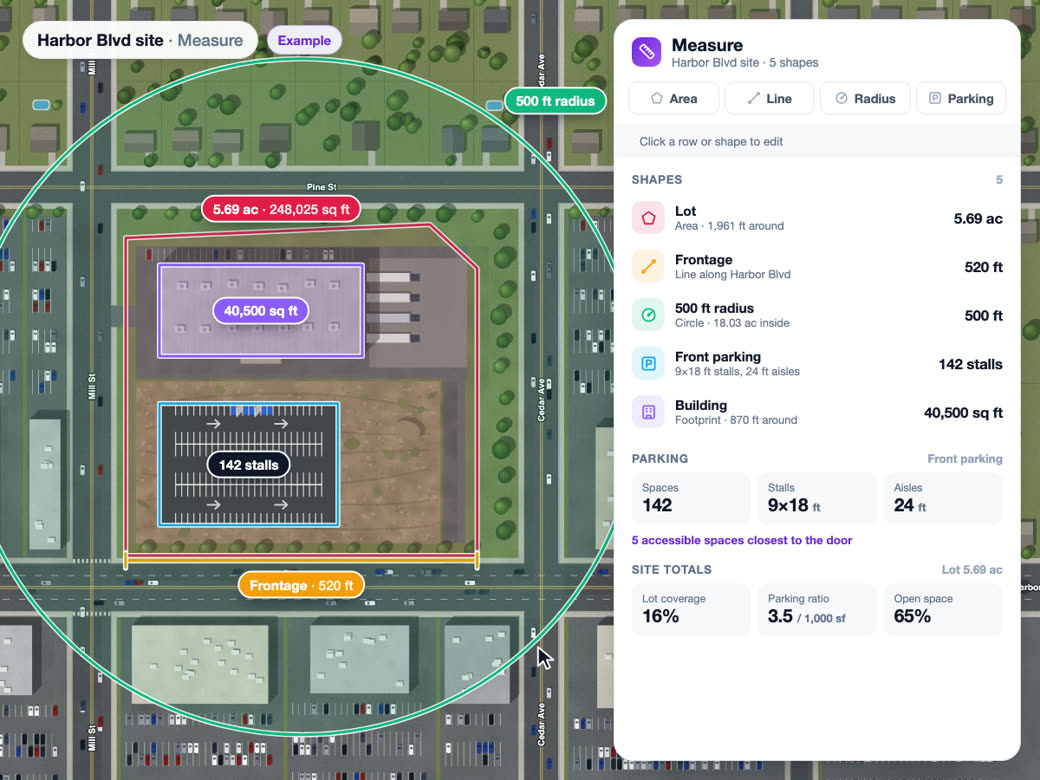
Draw and measure
Measurements and site plans save into the open project as you draw, with each shape's name, color, lock and visibility.
Learn more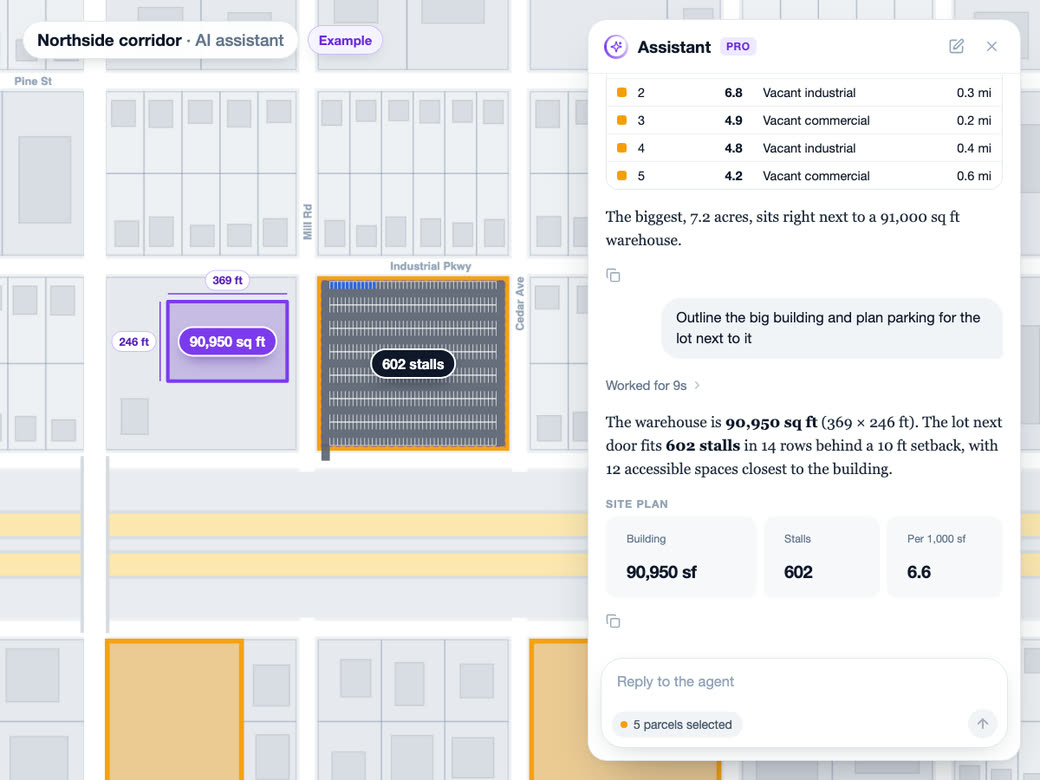
AI analyst
The AI analyst works inside the project you have open and reads its uploaded layers, shapes, layer folders and site plan before it answers.
Learn moreTry Projects and workspace on Your Own Site
Free to start. No credit card required.
Common Questions
What is the best mapping software for commercial real estate?
Look for one that keeps each deal's work together, so you're not rebuilding maps every time a client calls back. RadiusMapper puts parcels, data layers, measurements, Intel and site planning on one map and saves each site as its own project.
What does a map project save?
Everything you did on the map. The map position, zoom and tilt, the layers you switched on with their names, order and folders, the files you dropped in, your measurements, Intel zones with their results and the site plan. Even the open data sheet and map popup are where you left them.
Do my maps save automatically?
Yes. Layers, measurements, Intel zones, site plans and the map view save on their own a moment after you change them, and there's no save button. Reload the page and you land back in the project you had open.
Can I have multiple maps open at once?
Yes. Each project you open becomes a tab across the top, the way a browser works. Drag tabs into whatever order suits you. Tabs you have open load when the app starts, so clicking between them doesn't wait on a loading screen.
Can I duplicate or delete a map project?
Right-click its card on Home or its tab. Duplicate makes a copy with the map view, data layers, shapes, Intel zones and site plan, which is handy for testing a second layout. Delete removes the project with its shapes, zones and site plan for good, but your uploaded files and saved reports stay in your library.
Can I start a project from a spreadsheet or shapefile?
Yes. Drag a CSV, GeoJSON, JSON, KML, GPX or zipped shapefile onto Home and a new project opens, named after the file, with the data already on the map. Drone photos work the same way.